
 Resources & Catalogs
Selecting a new television is often driven by the desire for the largest possible screen. However, across diverse global markets—from the spacious villas of the Middle East to the rapidly modernizing urban homes in Africa and compact high-rise apartments in Southeast Asia—maximizing diagonal inches without calculating room logistics leads to suboptimal viewing experiences and spatial conflicts. Buyers frequently mismatch TV size to their viewing distance, resulting in eye strain, visible pixelation, or physical incompatibility with existing furniture and room layouts. A massive screen crammed into a small living space degrades image clarity and dominates the room's aesthetic.
Establishing the correct TV size requires a systematic evaluation of viewing distance formulas, screen resolution capabilities, and physical infrastructure constraints. You must specifically ensure your media console and room dimensions can safely accommodate the hardware. By applying industry-standard multipliers and measuring your physical space, you can pinpoint the exact screen size that delivers an immersive experience without overwhelming your living area.
The Standard Formula: The baseline rule of thumb for 4K TVs is to divide your viewing distance (in inches) by 1.5 or 1.6 to determine the optimal diagonal screen size.
Resolution Dictates Distance: Higher resolutions (4K and 8K) allow for closer viewing distances without visible pixelation compared to older 1080p models.
Hardware Compatibility is Critical: A TV’s diagonal measurement does not equal its physical width; buyers must verify that their media furniture is wide and deep enough to support the display's footprint and rated for its weight.
Ergonomics Matter: Optimal sizing must account for vertical placement, ensuring the center of the screen rests at seated eye level to prevent neck fatigue.
The foundation of TV sizing relies on human visual perception and field of view. The Society of Motion Picture and Television Engineers (SMPTE) recommends a 30-degree field of view for mixed usage. This angle provides a comfortable viewing experience for sports, news, and casual television watching without requiring you to turn your head to see the edges of the screen. It balances immersion with visual comfort.
For dedicated home theaters, the THX certification standard recommends a wider 40-degree field of view. This replicates the cinematic experience, filling more of your peripheral vision. Translating these angles into a practical consumer formula gives us the standard multipliers. To achieve the SMPTE 30-degree angle, divide your viewing distance in inches by 1.6. For the immersive THX 40-degree angle, divide the viewing distance by 1.2. These formulas provide a reliable mathematical baseline before factoring in room constraints.
Calculating the ideal screen size for a standard living room is straightforward. Measure the distance from your primary seating position to the wall or media console where the display will sit. Convert that measurement into inches. For example, a 10-foot viewing distance equals 120 inches. Divide 120 by 1.5, which gives you 80. This indicates a 75-inch to 85-inch class TV is the optimal target for that specific room layout.
For global users utilizing the metric system—which is the standard across Africa, the Middle East, and Southeast Asia—a quick-guide calculation simplifies the process. Multiply your viewing distance in meters by 25 to estimate the target diagonal screen size in inches. A viewing distance of 3 meters multiplied by 25 suggests a 75-inch TV. Keep in mind that these formulas are subjective. Round up if you are outfitting a dedicated, spacious media room (often found in large Middle Eastern properties) focused on movies and gaming. Round down for multi-purpose living spaces, such as those in dense Southeast Asian urban areas, where the television should not dominate the interior design.
Screen resolution fundamentally changes how close you can sit to a display. This is governed by Pixels Per Inch (PPI) and the human eye's resolving power. At a certain distance, the human eye cannot distinguish individual pixels. If you sit too close to a low-resolution screen, the image breaks down into a visible grid. This breaks immersion and causes visual fatigue. Higher pixel density allows you to sit closer or buy a larger screen without noticing the pixel structure.
Older 1080p displays require a farther viewing distance to maintain perceived image clarity. The multiplier for 1080p is roughly 2.5. This severely limits the maximum viable screen size in smaller rooms. In emerging tech markets across Africa and Southeast Asia, where many households are actively upgrading their home entertainment setups, placing a 65-inch 1080p TV in a small bedroom will result in a soft and pixelated image from the bed.
4K (UHD) is the current global industry standard. It packs four times the pixels of 1080p, allowing users to sit significantly closer or purchase much larger screens for the same room footprint. This is why the 1.5 multiplier works safely for modern displays. 8K resolution offers marginal returns at standard viewing distances. The human eye struggles to see the difference between 4K and 8K unless the screen is exceptionally large (85 inches or more) and the viewer sits very close. Smaller TVs under 43 inches see negligible benefits from 4K, while screens over 65 inches strictly require 4K or higher to maintain clarity.
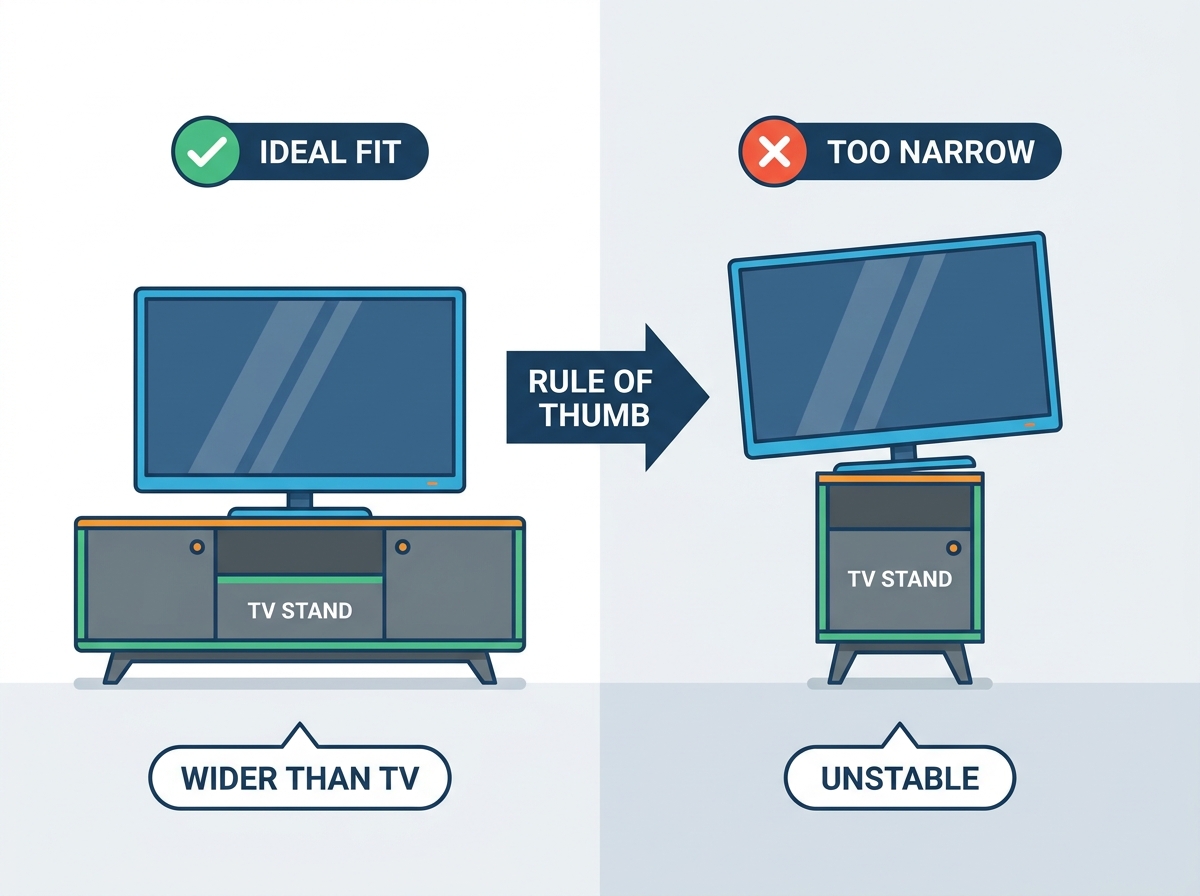
A common mistake is confusing the advertised diagonal screen size with the physical horizontal width of the unit. The diagonal measurement spans from corner to corner of the active display panel. The actual width measures straight across the bottom or top, including the bezel. You must know the actual width to ensure the display fits securely on your furniture.
Advertised Diagonal Size | Approximate Physical Width | Minimum Recommended Stand Width |
|---|---|---|
55 inches | 48 inches | 52 - 54 inches |
65 inches | 57 inches | 61 - 63 inches |
75 inches | 65 inches | 69 - 71 inches |
85 inches | 75 inches | 79 - 81 inches |
The overhang rule dictates that a TV stand should be at least 2 to 3 inches wider than the physical width of the TV on both sides. This means the furniture should be 4 to 6 inches wider overall. This prevents accidental tipping if someone bumps the edge and eliminates a visually top-heavy appearance. Whether you are furnishing a sprawling living room in the Middle East or maximizing space in a Southeast Asian condo, evaluating leg footprints is necessary. Center-pedestal stands require less surface area, but wide-set edge legs dictate the absolute minimum width and depth of the surface.
Depth is equally important. The furniture must comfortably hold the screen's feet while leaving 3 to 4 inches of clearance in front for a soundbar. This ensures the audio equipment does not obstruct the bottom of the screen or the infrared receiver. Furthermore, verify weight ratings and load limits. Modern large-format displays exceeding 75 inches are heavy. Ensure the wood, glass, or metal construction of your TV stand is structurally rated to support the specific weight of your chosen display.
Positioning a display in a corner restricts the maximum screen size. The walls angle inward, creating a hard physical limit for the screen's width. When calculating clearance for a corner setup, you must account for the diagonal depth of the furniture. Measure the distance from the corner to the front edge of the console, and then measure the available width at that specific depth. A screen that fits flat against a wall will often hit the adjacent walls when pushed back into a corner.
A massive screen impacts room flow and natural light. Large panels act like mirrors when turned off, reflecting glare from nearby windows—a critical factor to consider in the sun-drenched climates often found across Africa, the Middle East, and Southeast Asia. Consider the placement of supplementary audio equipment. AV receivers, center-channel speakers, and bookshelf speakers need space within or on the media console. Proper media console ventilation is mandatory. Heat buildup from amplifiers and gaming consoles housed inside closed cabinets will cause premature hardware failure. Ensure your furniture has adequate airflow and rear cutouts.
Ergonomics dictate that the middle third of the screen should align with the viewer's eye level while seated. Looking up at a display for extended periods causes severe neck fatigue. To calculate the optimal height, measure your seated eye height. This is typically 36 to 45 inches from the floor, depending on your sofa. Subtract half the TV's physical height from your seated eye height. The resulting number is the ideal height for the top surface of your media console.
Screen size impacts viewers sitting on the periphery of the room. As you move off-center, image quality degrades. Colors wash out and contrast drops. Different panel technologies handle off-axis viewing differently. OLED panels maintain perfect color and contrast at extreme angles. IPS LED panels offer decent wide viewing angles but suffer from lower native contrast. VA LED panels provide excellent contrast straight on but degrade rapidly when viewed from the side. Factor in your seating arrangement when selecting panel technology for a large room.
Overwhelming a small space with a massive screen leads to motion sickness during fast-paced content like sports or gaming. Your eyes are forced to dart back and forth across the panel to track the action. To mitigate this risk, tape out the exact physical dimensions of the display on the wall or above the furniture before purchasing. This visual aid helps you understand exactly how much vertical and horizontal space the unit will consume.
Purchasing a display that barely fits the furniture leaves zero clearance for soundbars, gaming consoles, or routing thick HDMI 2.1 cables. If the screen sits too low on its legs, a standard soundbar will block the bottom of the picture. Factor in an additional 3 to 5 inches of vertical clearance. Verify the furniture has adequate rear routing channels to hide power cables and interconnects, maintaining a clean installation.
Measure your primary seating distance in inches and apply the 1.5 divisor to establish your baseline 4K screen size.
Verify the physical width of the target display against your existing furniture, ensuring at least 4 inches of total overhang clearance.
Calculate your seated eye level to confirm the furniture height will keep the center of the screen ergonomically positioned.
Check the depth and weight capacity of your furniture to safely accommodate wide-set legs and heavy large-format panels.
Use augmented reality apps or painter's tape to visualize the exact dimensions on your wall before finalizing the purchase.
A: Measure the distance from your primary seating position to the wall in inches. Divide that number by 1.5. This formula provides the optimal diagonal screen size for modern 4K displays, balancing immersion with visual comfort.
A: Yes. The furniture should be at least 4 to 6 inches wider in total than the physical width of the display. This provides 2 to 3 inches of clearance on each side, ensuring safety, stability, and a balanced aesthetic for any room layout.
A: The furniture should be at least 15 to 20 inches deep. This accommodates wide-set legs, provides room for a soundbar in front of the screen, and safely houses peripheral media players or AV receivers below.
A: A 10x10 room typically yields a 7 to 8-foot viewing distance. At this distance, a 65-inch display is highly suitable for 4K viewing, provided the furniture does not overwhelm the physical wall space or block room traffic.
A: Sitting too close causes eye strain and neck fatigue, especially if the display is mounted too high. You will also begin to see the individual pixel structures on lower resolution content, which degrades the overall image quality.
A: The center of a 75-inch screen should rest at approximately 42 inches from the floor to match seated eye level. Because a 75-inch panel is tall, this requires a lower-profile piece of furniture, typically around 15 to 22 inches in height.
A: Yes. Gamers often prefer a wider field of view for immersion. However, this must be balanced against the need to track UI elements without turning the head. Sitting slightly closer or sizing up marginally is common for dedicated gaming setups.


