
 Resources & Catalogs
Deciding between a wall-mounted TV and a freestanding TV stand is not simply an aesthetic choice. For homeowners and buyers across Africa, the Middle East, and Southeast Asia, the right solution may also depend on room size, wall construction, climate conditions, rental restrictions, and the number of devices used around the television.
A compact apartment may benefit from a shallow console or a wall-mounted display, while a larger villa with a soundbar, satellite receiver, gaming console, and backup power equipment may require substantially more storage and structural support. Wall materials also vary between countries, cities, and individual buildings. Concrete, masonry, drywall partitions, and lightweight internal walls each require different mounting methods and load assessments.
Poorly planned placement can lead to an uncomfortable viewing height, visible cable clutter, inadequate equipment ventilation, or avoidable wall repairs. This guide provides a practical framework for deciding whether you need a TV stand and which type is most suitable for your room, equipment, and local installation conditions.
Ergonomic Alignment: A TV stand provides a reliable, fixed height that naturally aligns with seated eye level, preventing neck strain and avoiding common wall-mounting height errors.
Infrastructure Constraints: Renters or those with structural wall limitations (e.g., the solid concrete, brick, or hollow block walls prevalent in Middle Eastern and Southeast Asian construction) often require a freestanding unit to avoid strenuous drilling and costly wall repairs.
Equipment & Cable Management: High-capacity setups (gaming consoles, soundbars, receivers) necessitate the storage, structural support, and ventilation a dedicated stand provides.
Visual Anchoring: Beyond utility, a well-chosen media console grounds the room's design, preventing the "floating black screen" clinical aesthetic.
Layout Flexibility: Freestanding units allow for room reconfiguration and seasonal furniture shifts without the need to patch walls, paint, and remount heavy brackets.
The standard ergonomic rule for screen placement is straightforward. The middle third of your screen should sit exactly at eye level when you are seated. Deviating from this baseline creates immediate physical discomfort. Mounting screens too high introduces significant structural and medical risks. Consumer backlash regarding chronic neck fatigue and harsh glare has grown substantially as larger screens dominate the global market. When you tilt your head back to view a screen mounted 60 inches off the floor, you compress the cervical spine.
A dedicated media console acts as an out-of-the-box height calibrator. Furniture manufacturers design these units specifically to match standard sofa seating heights, which typically range from 17 to 19 inches off the floor. This neutralizes the risk of improper installation. You avoid the guesswork of measuring wall brackets, locating studs, and calculating drop distances while ensuring optimal viewing angles for extended gaming or movie sessions.
Screen Size (Diagonal) | Ideal Center Screen Height (from floor) | Recommended Console Height |
|---|---|---|
55 inches | 42 inches | 24 - 28 inches |
65 inches | 42 inches | 22 - 26 inches |
75 inches | 42 inches | 20 - 24 inches |
85 inches | 42 inches | 18 - 22 inches |
Visual clutter ruins the viewing experience. Dangling wires, exposed power strips, and scattered peripherals distract the eye and make a room feel chaotic. Routed cable management offers a clean, intentional look. A proper console hides power strips, thick HDMI cables, and bulky power bricks out of sight behind solid backing panels.
Interior design relies heavily on the concept of visual weight. A television floating on a bare wall often looks sterile or incomplete, lacking a foundation to anchor the entertainment area. A well-proportioned console solves this by acting as both a functional organizer and an aesthetic base. It grounds the room, tying the technology into your overall interior design scheme and providing a surface for secondary lighting or acoustic treatments.
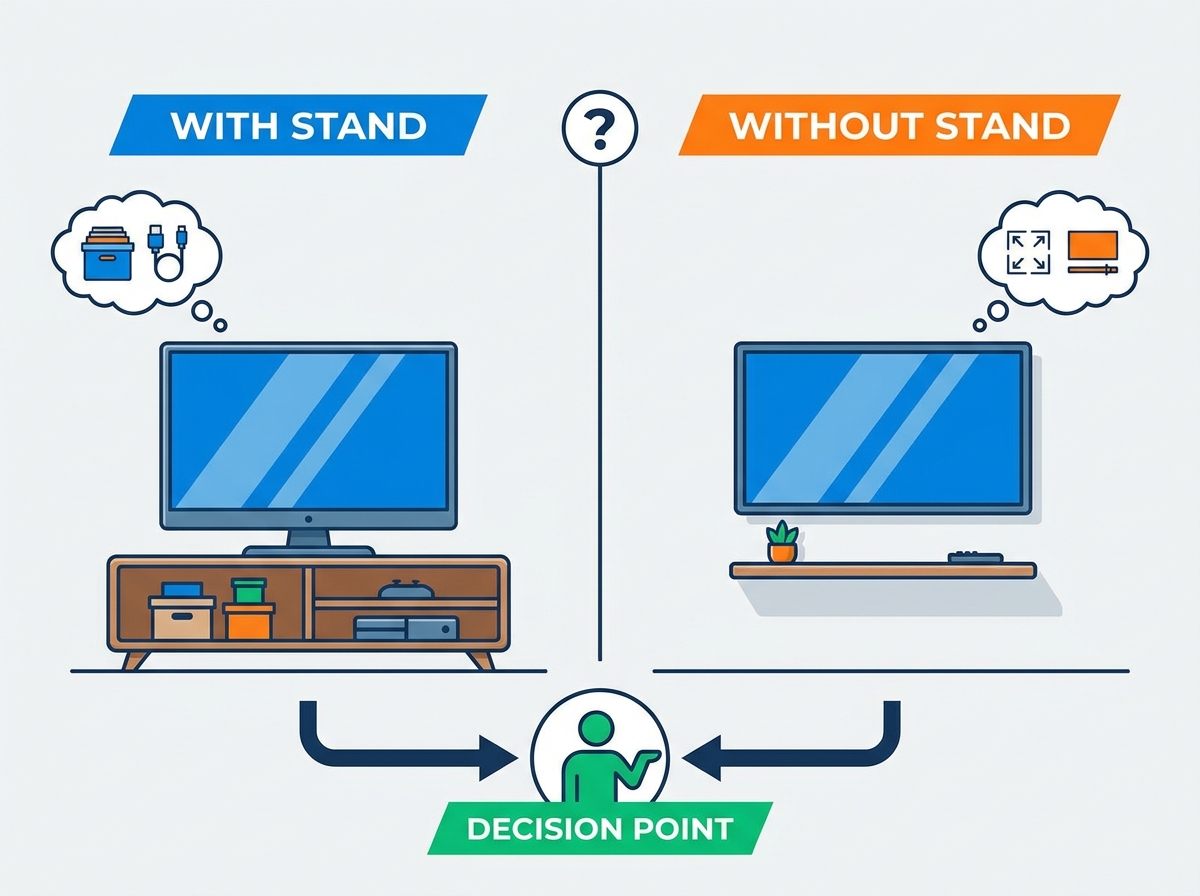
Wall mounting maximizes floor space and delivers a sleek, minimalist aesthetic. It keeps the screen safely out of reach of toddlers and pets. This approach works well in ultra-modern homes or extremely tight urban spaces where floor square footage is at a premium. You can utilize articulating mounts to pull the screen away from the wall and angle it toward different seating areas.
However, wall-mount regret is a real phenomenon. Mounting requires excellent structural wall integrity and creates permanent placement rigidity. In regions like Africa or Southeast Asia, where solid brick or concrete walls are standard, drilling requires heavy-duty hammer drills and specialized masonry anchors. Furthermore, running standard power cables inside walls often violates local fire codes or is completely unfeasible in concrete construction without expensive chasing and plastering. Upgrading to a larger screen later often means moving the mount entirely to maintain the correct eye-level center.
Using a freestanding unit offers immediate setup with zero wall damage. You gain built-in storage for physical media, controllers, and easy access to device ports. The furniture naturally provides optimal viewing height without requiring power tools, masonry drill bits, or wall modifications. You can unpack the unit, place the screen on top, and start watching immediately.
The primary limitation is physical floor space consumption. A console requires careful sizing to ensure structural stability. If poorly scaled, a massive wooden unit can make a small room feel cramped and crowded. You must balance the storage capacity you need against the available square footage in your room. Additionally, freestanding units require manual dusting and floor cleaning around the base, which is a consideration in dusty environments common to parts of the Middle East.
Many users who wall-mount their screens still place a console directly beneath it. This hybrid approach offers the best of both worlds. The screen remains flush against the wall, while the furniture below grounds the visual space and provides essential utility.
This setup provides necessary storage for soundbars, streaming boxes, and gaming consoles. It effectively hides low-voltage wall outlets and pass-through plates. You achieve the floating screen look while maintaining practical storage and cable management capabilities. It also provides a physical barrier that prevents people from walking too close to the mounted screen.
Regional location should not replace an on-site assessment, but it can highlight several practical factors that buyers should check before choosing a TV stand.
Housing conditions and climates vary considerably across African markets, so buyers should first confirm the wall material, room layout, and local installation capability. Where wall construction is uncertain or professional mounting services are not readily available, a stable freestanding console can simplify installation and reduce the risk of using unsuitable wall anchors.
The storage configuration may also need to accommodate more than a television. Satellite decoders, routers, gaming consoles, surge protectors, voltage regulators, or backup power equipment can all add to the required shelf space. A console with a reinforced top, adjustable shelving, rear cable openings, and adequate ventilation is generally more practical than a purely decorative unit.
In locations where dust or high indoor temperatures are concerns, completely open shelving may expose equipment, while fully sealed cabinets may trap heat. A balanced design with partially enclosed storage, ventilated rear panels, and surfaces that are easy to clean is often the better solution.
TV installations in Middle Eastern markets may range from compact rental apartments to large villas with 75-inch or 85-inch screens, sound systems, satellite receivers, and multiple entertainment devices. Larger installations require a wider console with center supports or an internal metal frame to prevent the top panel from sagging.
Concrete and masonry walls are used in many buildings, but wall construction should still be verified before drilling. Cable concealment can be more complicated when wires cannot be routed through the wall without cutting channels or carrying out additional finishing work. In these cases, a console with a full back panel, cable grommets, and space for a power strip provides a cleaner and more serviceable installation.
Dust control and heat dissipation must be considered together. Closed cabinet fronts can reduce visible dust, but receivers and gaming consoles still require rear ventilation. Raised legs or sufficient clearance beneath the unit can also make routine floor cleaning easier.
In many Southeast Asian cities, smaller apartments and condominiums make furniture depth just as important as width. A shallow console, corner stand, or compact raised-leg design can preserve walking space while still providing storage for streaming devices, routers, and gaming equipment.
Humidity levels can be high in many tropical and coastal locations, although conditions vary by country and whether the room is climate-controlled. Buyers should therefore examine the quality of the surface finish, panel edge sealing, metal hardware, and cabinet backing rather than relying only on a general material label such as “MDF” or “solid wood.” Moisture-resistant boards, properly sealed edges, and corrosion-resistant hardware can improve long-term durability.
Some high-rise buildings also use lightweight internal partition systems rather than solid structural walls. Before installing either a television or a floating console, the wall substrate and permitted mounting load should be confirmed with the building manager or a qualified installer.
Most lease agreements strictly prohibit heavy wall anchors. Landlords do not want tenants drilling deep holes to support a large display. If you rent, a freestanding unit is usually your only viable option to ensure you get your security deposit back.
Technical architectural barriers also dictate placement. In many African and Middle Eastern homes, concrete and hollow block walls are the standard. These require hammer drills and specialized masonry anchors that are difficult to install properly. Non-standard metal studs, common in modern Southeast Asian high-rise apartments, cannot support heavy lag bolts. A sturdy console bypasses these structural masonry headaches entirely.
Modern entertainment setups require substantial hardware. AV receivers, gaming consoles, physical media players, and streaming devices take up significant space. These components need a dedicated home with proper ventilation and structural support.
Close proximity between these devices and the screen is necessary. Long HDMI runs over 15 feet are expensive, prone to signal degradation, and difficult to hide without opening up the wall. A media console keeps all peripherals directly under the screen, ensuring short, clean cable connections and easy access to rear panels when you need to swap a device.
Wall mounts create a rigidity trap. Once the screen is bolted to the wall, your room layout is essentially locked. Moving a freestanding unit requires zero structural repair. You simply slide the furniture to a new wall or angle it differently in the corner.
Moving a wall mount requires unmounting the screen, removing the heavy steel bracket, plastering the holes, sanding, repainting, and redrilling in the new location. If you enjoy frequent furniture shifts or reconfiguring your living space, a mobile or freestanding setup is highly recommended.
Installing recessed power bridge kits and hiding cables inside walls is difficult and labor-intensive. It requires specialized tools and electrical knowledge. In the Middle East or Southeast Asia, channeling into solid concrete or block walls for cable management is highly impractical and expensive.
A quality TV stand naturally conceals cables along its back panel. You do not need to penetrate the wall. Built-in grommets and cable routing channels keep everything organized and out of sight with minimal effort. You can easily bundle excess wire lengths using zip ties and tuck them behind the internal shelving.
Certain environments require screens to move. Rolling carts or heavy-duty outdoor easel stands provide multi-room mobility. These are perfect for corporate offices, large villas, or semi-outdoor patios where permanent installation is impractical.
Outdoor setups demand strict performance and safety standards. You must use materials with UV resistance, weatherproofing, and rust-resistant hardware. The base must feature a low center of gravity to withstand sudden wind gusts and prevent tipping. Mobile units allow you to wheel the screen back indoors securely.
Standard consoles and credenzas are best for maximum storage and hiding cables. They suit traditional or transitional aesthetics and easily support heavy, complex setups. These units offer robust construction, ample interior space, and often feature solid wood or heavy MDF frames.
When evaluating standard models, look for adjustable shelving to accommodate different device heights. An AV receiver requires much more vertical clearance than a slim streaming box. Ensure the unit has solid backing and pre-drilled cable routing ports. This makes connecting receivers and gaming consoles much easier without having to drill your own holes.
Floating consoles are ideal for small footprints and modern minimalist aesthetics. Because they do not touch the ground, they make floor cleaning incredibly easy, which is a major advantage in dusty or sandy climates. They create an illusion of more space in tight urban apartments by exposing the floor beneath the unit.
Note that these units require wall mounting, similar to the screen itself. Weight capacity is strictly limited by wall anchor strength. You must secure them directly into solid masonry or wooden studs to prevent catastrophic failure. Never mount a floating console using only standard drywall anchors.
Corner units work best for awkward room layouts. They maximize dead space in smaller apartments or bedrooms where flat wall space is limited by windows or doors. Their triangular or hexagonal shape pushes the screen deep into the corner, opening up the center of the room.
Corner depth is a critical evaluation metric. Ensure the top surface can accommodate the exact footprint of your screen's base legs. Measure carefully, as wide-set legs often hang off the edges of smaller corner units. You must measure the distance from the front edge of the stand to the back corner to ensure the screen will not hit the walls.
These mobile options are best for flexible multi-room setups. They fit perfectly in modern lofts, corporate offices, or minimalist studios. Easel stands offer a unique, artistic look that mimics a painter's canvas, often utilizing tripod leg designs.
Safety is paramount with these designs. They must feature locking casters, heavy-gauge steel, or solid wood construction. A wide, stable base is absolutely necessary to prevent accidental tipping when moving the unit across thresholds or thick carpets. Always check the VESA mounting compatibility to ensure your screen will bolt securely to the stand's bracket.
Understanding the diagonal versus horizontal width discrepancy is vital. Screens are measured diagonally across the display. Furniture is measured horizontally across the top surface. A 65-inch screen is not 65 inches wide; it is roughly 57 inches wide horizontally.
Follow the golden rule of sizing. The furniture should be at least 2 to 3 inches wider than the total physical width of the screen on both sides. This prevents a top-heavy look, awkward overhangs, and accidental bump hazards as people walk past. A wider base also provides a better visual foundation and leaves room for bookshelf speakers on either side of the display.
Material choice impacts long-term performance and structural integrity. Solid wood and heavy-gauge steel offer the best durability and load capacity. MDF and engineered wood are cost-effective but may warp over time if overloaded or exposed to the high humidity typical of Southeast Asian and African climates. Solid wood and powder-coated steel are highly recommended for longevity in these environments.
Long-term sag resistance is crucial. Large-format screens and heavy center-channel speakers exert significant downward pressure on the top panel. Ensure the top panel features center support legs or reinforced steel framing to prevent bowing over the years. A sagging top panel will eventually cause cabinet doors to stick and misalign.
Material Type | Durability / Sag Resistance | Best Use Case |
|---|---|---|
Solid Hardwood (Oak, Walnut, Teak) | Excellent (High load capacity) | Heavy AV setups, large screens, humid climates |
Engineered Wood / MDF | Moderate (Prone to sagging if unsupported) | Budget setups, lighter screens, climate-controlled rooms |
Powder-Coated Steel | Excellent (Maximum rigidity) | Industrial aesthetics, mobile carts, heavy equipment |
Tempered Glass | Low to Moderate (Shatter risk) | Minimalist designs, lightweight modern screens |
Modern gaming consoles and AV receivers generate immense heat. In regions with warmer ambient climates—such as the Middle East, Africa, and Southeast Asia—proper thermal management becomes even more critical. Proper airflow prevents hardware throttling, random shutdowns, and premature component failure. Electronics need to breathe to maintain optimal operating temperatures.
Avoid fully enclosed cabinets without adequate airflow. Look for slatted doors, open-back designs, or integrated active cooling fans. If you must use solid doors, ensure there is enough internal clearance around the devices for heat to dissipate naturally. You should leave at least three inches of clearance on the top and sides of any high-heat device.
Top-heavy setups present a critical risk, especially in homes with active children or large pets. A bumped console can result in a shattered screen or severe injury. Stability must be your top priority during installation, regardless of the furniture style you choose.
Mitigate this risk by using anti-tip furniture straps. Anchor the console directly to the wall or masonry using heavy-duty screws. Additionally, use VESA-compatible safety cables to tether the screen directly to the furniture or the wall behind it. This creates a fail-safe system against tipping. Never place heavy items in the top drawers of a console, as this shifts the center of gravity forward.
Modern screens often utilize wide-set "duck feet" style legs rather than a heavy center pedestal mount. These legs sit at the extreme edges of the display, requiring a very wide surface to rest on safely. Older screens used center pedestals that could sit on much narrower surfaces.
Measure the exact distance between the outer edges of the feet before purchasing your furniture. Do not rely solely on the screen size. Failing to measure this footprint often results in a screen that physically cannot sit on the surface without falling off. If your screen's legs are too wide for your preferred furniture, you can purchase an aftermarket VESA pedestal stand to replace the factory legs.
Measure your screen's actual horizontal width and the exact distance between its base legs to determine the minimum required furniture width.
Inventory your peripheral devices, noting the height and depth of your largest components like AV receivers, to ensure the internal shelving provides adequate clearance and ventilation.
Evaluate your room's wall structure—be it concrete blocks or drywall—to determine if you can safely anchor anti-tip straps or if you need to adjust the placement entirely.
Select a furniture unit with slatted doors or open backing if you plan to store high-heat devices, especially important in warmer global regions.
A: No, using an undersized unit poses severe safety, structural, and aesthetic risks. The furniture should always be wider than the physical screen frame. This maintains center-of-gravity balance, prevents accidental bump hazards, and ensures proper visual proportion in your room.
A: The ideal height depends on your seating. The middle of the screen should sit at eye level when seated. Taking average sofa heights into account, this typically requires a furniture height of 22 to 26 inches to achieve proper ergonomic alignment.
A: While not required, a console beneath a mounted screen grounds the room's design. It houses streaming components, routes peripheral wires, and prevents a sterile, clinical aesthetic. It provides essential storage that wall mounts cannot offer.
A: Floating consoles are safe only if installed correctly. They have strict weight capacity limitations. You must anchor them directly into solid masonry or structural wooden studs. Never mount a floating console to weak drywall alone, as it will inevitably fail under heavy loads.
A: You can hide cords using adhesive cable clips, zip ties, and cable management boxes. Split-sleeves bundle wires neatly. Utilize the furniture's built-in grommets and double-backed panels to route cables out of sight without drilling into your walls.


